MCC – How can turtle make pattern, here is how

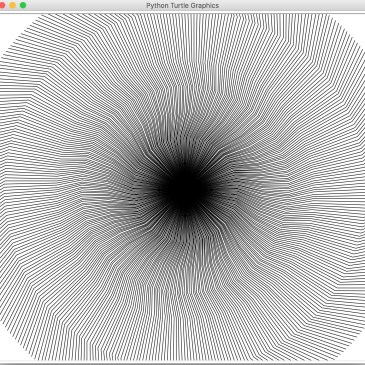
As we continue to learn turtle drawing, each of us came up with different patterns with favorite color and speed. Here is one example, import turtle turtle.speed(500) for i in range(360): turtle.forward(100) turtle.right(20) turtle.forward(50) turtle.left(10) turtle.forward(50) turtle.left(20) turtle.forward(50) turtle.right(10) turtle.forward(100) turtle.left(30) turtle.forward(100) turtle.right(30) turtle.penup() turtle.setposition(0,0) turtle.pendown() turtle.left(1) turtle.done() Final pattern  
MCC – mBot – Follow path

We decided to switch back to mBot programming, the first one we started with follow path. Even though coding looks simple there are multiple pieces can go wrong. First time we uploaded Arduino module directly into mbot. We are planning to explore few other projects to make mBot to do more interesting stuff for us.

MCC – Turtle

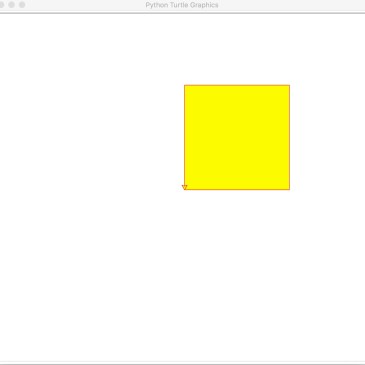
Python turtle is fun to learn, it teaches graphics in easy way. We started with basic shape and fill color as below import turtle turtle.color(‘red’,’yellow’) turtle.begin_fill() turtle.forward(200) turtle.left(90) turtle.forward(200) turtle.left(90) turtle.forward(200) turtle.left(90) turtle.forward(200) turtle.end_fill() turtle.done() Output would be we continued to add few more line of code to learn about pattern import turtle turtle.speed(500) for … More MCC – Turtle

R2D2 – Scratch

R2D2 team has been busy leaning Scratch!!! We completed scratch basic to understand how to make sprite move up, down, left and right. From there we learned to change costumes and background. We also added way to attack incoming balls with watermelon. It was so awesome to learn to new game development. You can find … More R2D2 – Scratch

MCC – Python fun

We have been learning python for last two weeks, we started with downloading python https://www.python.org/downloads/  and setup IDE pycharm https://www.jetbrains.com/pycharm/download/ . First we started with HelloWorld as always, Super easy print(“hello world!”) Then moved on to math operations number1 = 100 number2 = 200 print(number1 + number2) Learned order of operation math = 20 + 30 – 5 … More MCC – Python fun